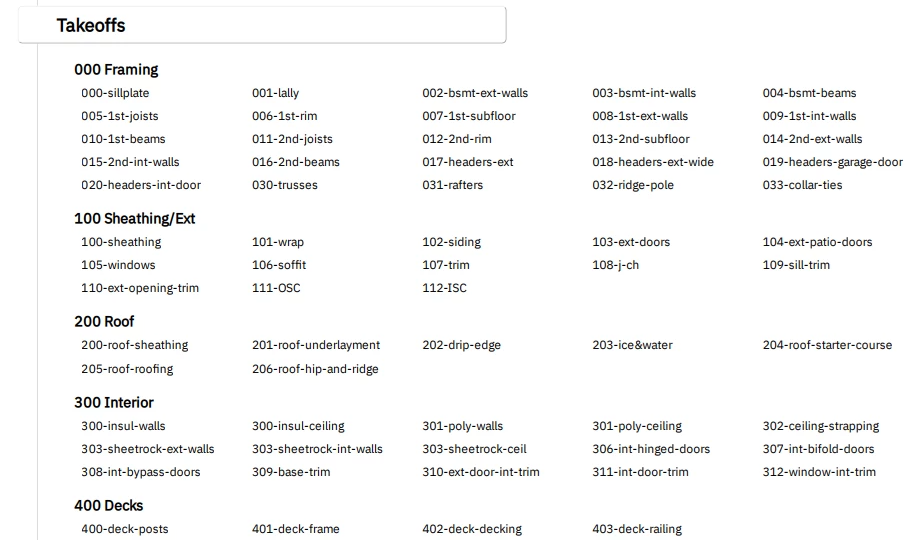
Has anyone got a good one? Mine’s still in flux. I number them all so they export out (from the items list report, grouped by takeoff name) in the order that the builder will need them. 001-sillplate shows up first on the list, then goes on the truck first and ends up on the top of the pile on the jobsite (to be used first).
I hope I’ve attached my list (going to try anyway), but this was what I was using a couple years ago. It’s changing now that I’ve taken a new gig doing takeoffs for more complicated houses. Anyone else lay it out like this? This might be the dumb way too, so if there’s a better way, let me know.
@craig.parker I like the way this is laid out in order for the team to be more efficient when the truck is delivered with Material! We have had other users share the same layout based on the item list grouping method 😎
It helps group them when I’m dumping out to our Point of Sale too. I’m very anti-hand-keying, so I like exporting to csv, massaging a smidge, and sucking into POS. Have to figure out to do it in Epicor Eagle shortly. I had Spruce nailed down, and LBM LiftOff...
Mostly deleting/rearranging columns to whatever format the point of sale system won’t choke on. I wrote PHP scripts to parse the report csv files for the other systems, but I’m not allowed to install software on my PC here, so I’ll have to do it in Excel
You should consider using our Estimate Worksheet for exporting data. The layouts are customizable, even better than reports. Custom views can be saved. So, you can create an export view that may eliminate/reduce the need to massage the data outside of STACK.

Comments
STACK_Tim
@craig.parker I like the way this is laid out in order for the team to be more efficient when the truck is delivered with Material! We have had other users share the same layout based on the item list grouping method 😎
craig.parker
It helps group them when I’m dumping out to our Point of Sale too. I’m very anti-hand-keying, so I like exporting to csv, massaging a smidge, and sucking into POS. Have to figure out to do it in Epicor Eagle shortly. I had Spruce nailed down, and LBM LiftOff...
STACK_Tim
@craig.parker Out of curiosity, after exporting to CSV, what information needs to be massaged ?
craig.parker
Mostly deleting/rearranging columns to whatever format the point of sale system won’t choke on. I wrote PHP scripts to parse the report csv files for the other systems, but I’m not allowed to install software on my PC here, so I’ll have to do it in Excel
STACK_Tim
Very Cool! I feel like your method at this time is the best approach when exporting reports for another software
DaveElfers
Craig,
You should consider using our Estimate Worksheet for exporting data. The layouts are customizable, even better than reports. Custom views can be saved. So, you can create an export view that may eliminate/reduce the need to massage the data outside of STACK.
craig.parker
I don’t know why I’m just seeing this now…
I’m going to reach out to my manager dude and see if he can get me set up with a training - I’ve never touched the estimates side of Stack.
Please sign in to leave a comment.