New to the STACK Community? Start Here

Welcome to the STACK Community! This is the place to ask questions, share ideas, and learn from other STACK users and our team.
First Time Posting? Sign In First
All STACK customers already have an account in our system; however, if it is your first time to the help center you'll have to request a password.
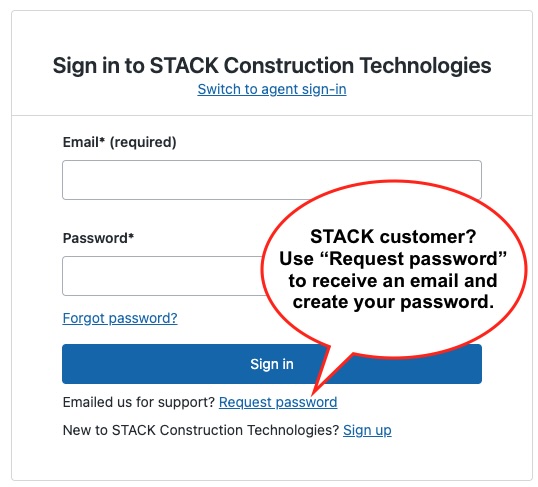
- Click Sign In (top right)
- Click Request password
- Enter your STACK email and an email to create your password will be sent to you.
You only need to do this once.
Where Should I Post?
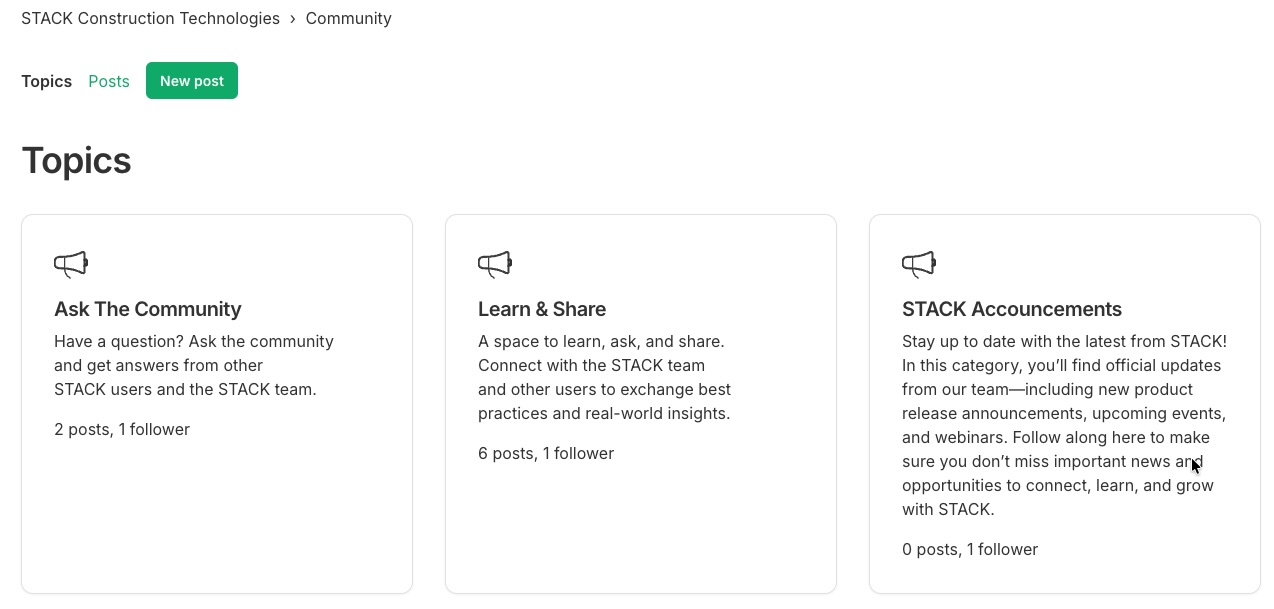
You’ll see a few main areas when you visit the Community, plus some additional groups.
Most posts should go in:
- Ask the Community: Use this for questions, troubleshooting, and “how do I…” topics.
Post in:
- Learn & Share: If you have a unique way you use STACK, a tip, or a best practice to share with others.
STACK Announcements: Read-only updates from the STACK team.
Some groups are more specific, but when in doubt, Ask the Community is the right place.
How to Create a Post
- Click New post
- Add a clear title
- Include details or context in the description - feel free to add links and photos!
- Choose the most relevant topic
- Click Submit
That’s it.
Tips for Better Posts
- Be specific in your title. Example: “How do I create a template project?”
- Add screenshots or examples when helpful
- Choose the closest matching topic
- Search first. Your question may already be answered
- Reply if someone asks for more details
How to Engage
- Like or reply to helpful answers
- Follow posts you want updates on
- Share what worked for you
The more you participate, the more valuable the Community becomes for everyone.
If you have trouble signing in, start with Request password, or contact Support.
0
Comentarios
Iniciar sesión para dejar un comentario.