How to Submit and Track My STACK Support Tickets

The STACK Help Center is the easiest way to get support and track your requests.
First Time Here? Sign In
All STACK customers already have an account in our system; however, the first time to our help center you'll need to create a password.
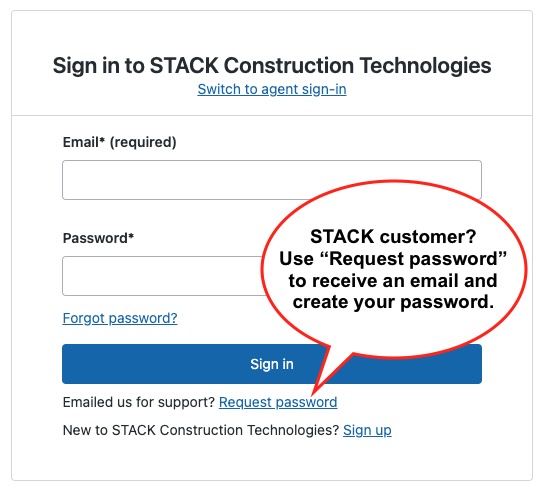
- Click Sign In (top right)
- Click Request password
- Enter your work email and set your password
You only need to do this once.
Submit a Support Ticket
- Click Contact Support (top right) - this takes you to the request page
- Choose the request type - Which platform do you have a question about: Takeoff & Estimates or Build & Operate?
- Fill out the form, add details, and click Submit
Your request goes directly to the STACK Support team.
Track Your Tickets
Once signed in:
- Click your profile icon (top right)
- Select Requests
- View open, pending, and past tickets
- Reply or add updates anytime
Using the Community
Use the search feature or go directly to the STACK Community. Use the Community to:
- Ask questions
- Learn from other STACK users
- Find common answers
If something needs direct support, we’ll guide you to submit a ticket.
Need help signing in? Start with Request password or contact Support.
0
Comentarios
Iniciar sesión para dejar un comentario.