Updating Items (Pricing/Details)

Posted by: Devon Streckfuss
When you change the Price/Details of an Item, those changes will apply to any takeoff that Item is attached to in your entire STACK account. This means you will immediately see these changes in any “Report”, or new “Estimate” that you create in a project where the updated item is used.
The changes you made will NOT appear in any existing Estimate which contains those items.
You can update the Price/Details of an Item by searching for it in your "Libraries" menu within STACK, then manually adjusting the field values, and using the "Save" button afterwards to save your changes.
If you’re looking for a faster way to make changes to a large number of Items all at once:
1. Export your Items from STACK:
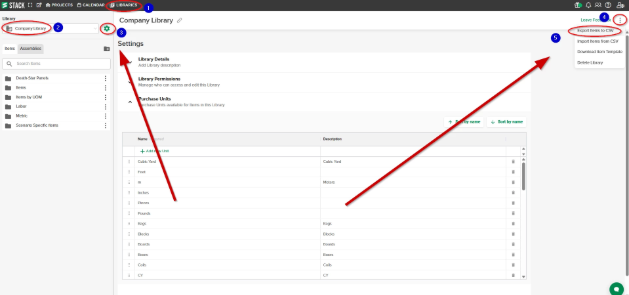
2. Make your necessary changes to the Items in the spreadsheet that downloads to your device.
3. When you’re finished making changes to the Items in your export spreadsheet, reach out to the STACK support team over the chat messenger (bottom-right corner of STACK) to ask that they help you with uploading those changes to the subsequent Library.
NOTE: if you do not see the Library you’re looking for, or the option to export it, you may not have the proper permissions applied to your user account. You can reach out to a user of your company account who is an “Account Owner” to ask they they grant you proper permissions.
Comentarios
Iniciar sesión para dejar un comentario.