Grouping the Takeoff List Into Folders

To organize the contents of your Takeoff list for any given Project into folders, you can select the “Group by” dropdown menu located at the top of the “Plans & Documents” menu within the “Plans & Takeoffs” section of the Project in question.
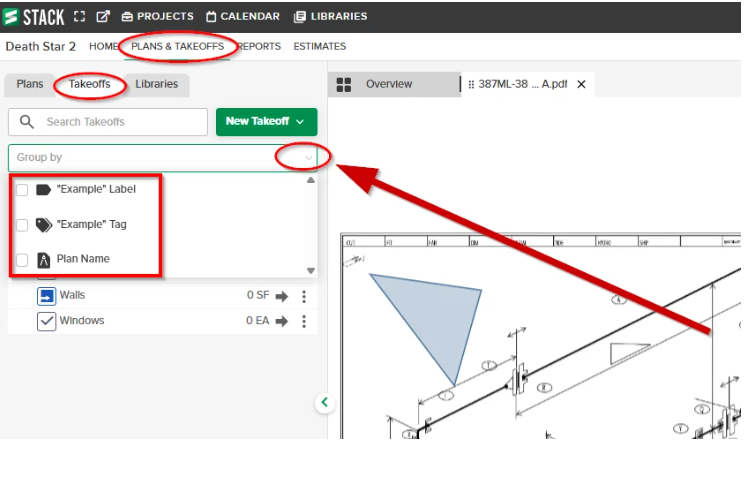
There are three different methods which you can use to group your Takeoff list within any project into folders so that you can organize them more efficiently:
Takeoff Tags
- Takeoff Tags allows you to create custom categories to organize Takeoffs within a project. You can create Tags based on floor, phase, CSI code, whatever works for your team!
- Click here for a support article on Takeoff Tags
- Click here for a short training video on Takeoff Tags
Label
- Labels can be created and applied to measurements giving you more ways to group/filter the cost data associated with those measurements. One Label can be applied to measurements from multiple Takeoffs.
- Click here for a support article on Labels
- Click here for a short training video on Labels
Plan Name
- When you group your Takeoff list by Plan Name, you can easily see which Takeoffs you’ve used to place measurements on specific plans in a project.
- You can click on the name of the plan when it appears as a folder in the Takeoff list to navigate directly to that plan.
Click here for a support article on grouping the Takeoff list.
0
Comentarios
Iniciar sesión para dejar un comentario.