Custom Status Feature to Filter Completed Projects

Your Project List can get very long! Utilize the Custom Status feature to assign your completed projects to an “Archive” status. (Only those with access to Account Settings will be able to create/modify the status’.)
Navigate to:
- Account Settings
- Select Company Settings
- Scroll down to Project Settings
- Click on the edit pencil next to Project Status
- Here you can modify as well as add new status’
- To add a new status, scroll to the bottom of the list and select Add Another Status
Here I have created one called ARCHIVE
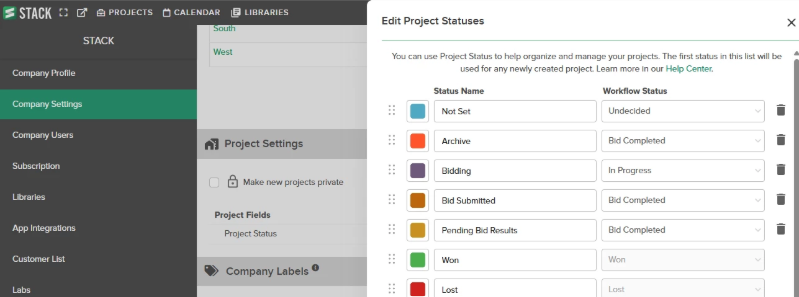
In your Project List Screen, assign the status of Archive to all completed projects
Click on the Filter icon above the Status column

Select all but the Archive status
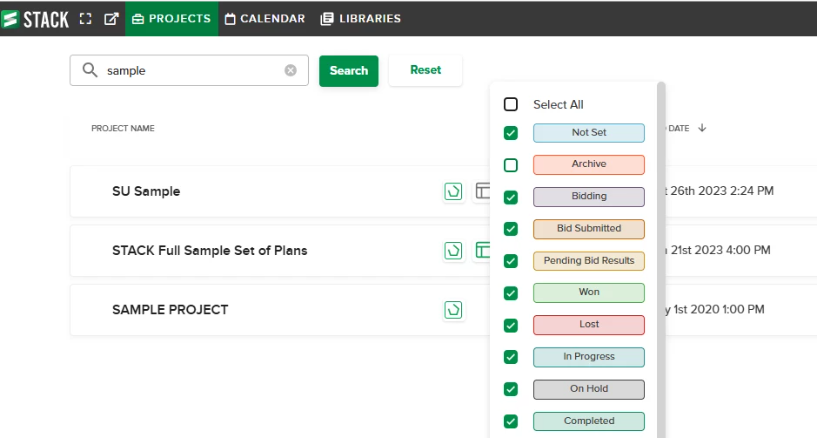
STACK will remember this filter and exclude all projects with an Archive status. If you want to go back and view those Archived projects, simply change the filter option.
*Note- you do not have to create a custom status. The COMPLETED status can be used as well.
0
Commentaires
DaveElfers
That’s a clever solution
STACKSarah
Great idea @STACK_Brenda!
KevinMurphy
Super helpful! 👍🏻
Is there a method to remove the archived files/projects from the list to an accessible backup in case it is needed in the future?
Jim Coster not at this time, but I will share this with our product team for future consideration.
Vous devez vous connecter pour laisser un commentaire.