Grouping by Item in an Estimate

I can’t remember if someone already said “No,” or not. I was told by a salesman he’d like to have an Item Usage column in my estimates, in case his builders wonder what something is for (Openings, Sill, Studs, Beams, etc.).
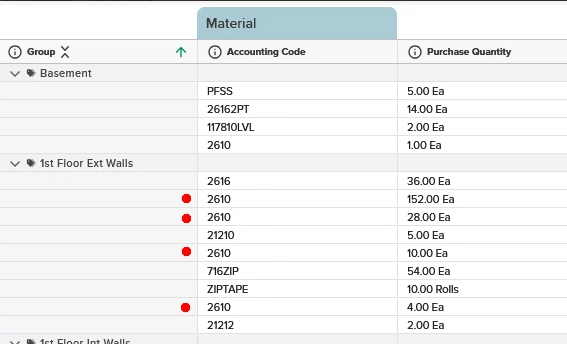
But when I hand a simplified version (just a different saved view) off to a counter person that’s going to key it into our POS system, they’re going to have to math on the fly. Anyone figured how to group by accounting code? I don’t see it staring me in the face, so I’m wondering if there’s a hack/workaround someone’s figured out.
Or maybe it really IS staring me in the face…
In my current scenario, I’m trying to have just one line (with a qty of 194) of 2610 in the 1st Floor Ext Walls group.
1
Commentaires
craig.parker
Half answered my own question… The Items List report will do this, but not with the rounded up quantities...
Jason Armstrong
I too would like to know this. I’d love to just roll up the entire estimate by accounting code so it looks just like my budget.
craig.parker
I think I figured it out. One of these is the estimate I’m looking at as I go through the project, the other is what I’m handing off for someone to key in POS. Then I took a shot of a takeoff so you can see how my tags are working.
craig.parker
I think I figured it out. One of these is the estimate I’m looking at as I go through the project, the other is what I’m handing off for someone to key in POS. Then I took a shot of a takeoff so you can see how my tags are working.
Vous devez vous connecter pour laisser un commentaire.